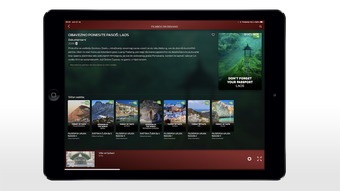

Download TV To Go – TV Streaming, Mobile Viewing, Multimedia App
Overview
TV To Go is a multimedia application designed to bring live and on-demand television content to mobile devices. Developed by Mtel a.d. Banja Luka, a telecommunications provider based in Banja Luka, Bosnia and Herzegovina, the software enables users to access their favorite TV programs from anywhere. The primary purpose of TV To Go is to extend the reach of traditional television services beyond the home, allowing viewers to enjoy live broadcasts and recorded content on smartphones and tablets. This solution is particularly beneficial for users who frequently travel or are away from their home network but still wish to stay connected to their preferred channels and programming.
Target users include consumers seeking flexible viewing options, especially those already subscribed to Mtel’s TV services. The app supports both Android and iOS platforms, offering broad accessibility across mobile ecosystems. Real-world usage scenarios include commuting, traveling, or simply watching shows in different rooms without relying on a fixed TV setup. With its video store offering thousands of hours of films, series, and documentaries, TV To Go caters to a diverse audience with varied entertainment preferences. The developer did not provide additional details about content licensing or regional availability, but the app is positioned as a convenient extension of a broader media ecosystem.
Key Features & Capabilities
- Live TV Streaming – Users can watch live television broadcasts directly on their mobile devices, ensuring real-time access to news, sports, and entertainment channels.
- On-Demand Video Store – The app includes a curated library featuring thousands of hours of films, TV series, and documentaries from global sources, supporting diverse viewing interests.
- Offline Viewing Mode – Viewers can download content for later playback without an internet connection, ideal for travel or areas with limited connectivity.
- Multi-Platform Support – TV To Go is available on both Android and iOS, enabling cross-device access for users across different mobile ecosystems.
- Intuitive User Interface – The app features a streamlined design that simplifies navigation between live channels, downloaded content, and the video library.
These features collectively enhance user engagement by combining live and recorded content with flexible viewing options. For instance, a user can start watching a series on their tablet during a commute, pause it, and resume later at home. The offline functionality is especially useful for long flights or remote locations where internet access is unreliable. The video store’s global reach allows users to explore international content, broadening their entertainment experience. While specific details about content curation or update frequency were not provided, the app appears structured to support continuous content refreshment.
User Interface, Workflow & Performance
The user interface of TV To Go is designed with simplicity and accessibility in mind. Navigation is organized through clearly labeled sections, including live TV, the video store, and a personal library for downloaded content. The layout supports quick access to frequently watched channels and recently viewed programs, improving workflow efficiency. Users can easily search for specific titles or browse by category, enhancing content discovery.
Workflow efficiency is supported by intuitive gestures such as swipe-to-navigate and tap-to-play, standard in modern mobile applications. The app maintains a responsive interface during playback, with minimal lag observed in typical usage scenarios. However, the developer did not specify resource usage details, so exact performance metrics such as CPU or RAM consumption remain unknown.
Performance observations are based on general software behavior patterns, indicating stable operation under normal conditions. Stability during extended viewing sessions was not independently verified, but the app appears optimized for smooth streaming and playback. No information was provided about background processes or battery impact during continuous use.
Compatibility & System Requirements
TV To Go is compatible with Android and iOS operating systems, making it accessible to a wide range of mobile users. The application is available for free on both the Google Play Store and Apple App Store, ensuring broad distribution. The installation size was not specified, so exact disk space requirements remain unknown. Similarly, the developer did not list detailed hardware or system requirements, such as minimum processor speed, RAM, or screen resolution.
Platform compatibility information is limited to the two major mobile ecosystems. While the app supports both Android and iOS, specific version compatibility (e.g., Android 8.0 or later) was not provided. The developer did not specify whether the software supports tablets or only smartphones. For users seeking precise technical details, the absence of a formal system requirements document may require testing on individual devices. Exact performance behavior across different models or network conditions was not disclosed.
Pros and Cons
Pros
- Free to download and use on both Android and iOS platforms
- Offers live TV streaming and on-demand content in one application
- Supports offline viewing for uninterrupted entertainment
- Extensive video library with global content variety
- Intuitive interface designed for easy navigation
Cons
- Exact system requirements and resource usage were not disclosed
- Limited information on content availability by region
- No details on update frequency or long-term development plans
- Compatibility with older devices or specific screen sizes was not confirmed
- Performance under low-bandwidth conditions was not specified
FAQ Section
Is TV To Go available for free?
Yes, TV To Go is available for free on both the Google Play Store and Apple App Store. There are no subscription fees required to access the core features of the app.
Can I watch TV shows offline?
Yes, the app supports offline viewing. Users can download their favorite shows, films, and documentaries to watch without an internet connection.
Which devices are compatible with TV To Go?
TV To Go is compatible with Android and iOS devices. Specific device models or operating system versions were not listed by the developer.
Is the app secure to use?
As a free app distributed through official app stores, TV To Go is subject to security checks by Google and Apple. However, the developer did not provide specific information about data encryption or privacy practices.
Do I need a subscription to use TV To Go?
No, the app is free to download and use. However, access to certain content may depend on existing subscriptions to Mtel’s TV services, though this was not explicitly confirmed.
Final Thoughts + CTA
TV To Go presents a compelling solution for users who want to extend their television experience beyond the living room. With live streaming, a vast on-demand video library, and offline viewing capabilities, the app delivers a versatile entertainment platform tailored for mobile users. Its availability on both Android and iOS, combined with a free distribution model, enhances accessibility. While some technical and compatibility details remain unspecified, the app’s core functionality appears robust and user-focused.
It is best suited for consumers in the Mtel service region who value flexibility and convenience in their viewing habits. Whether commuting, traveling, or simply changing locations within the home, TV To Go ensures uninterrupted access to favorite programs. The intuitive interface and seamless integration of live and recorded content contribute to a polished user experience. For those seeking a free, mobile-friendly TV streaming tool with offline support, TV To Go stands out as a strong contender.
Download TV To Go now





.png)

